

How to Connect IndexNow for Bing Webmaster Tools?

Let’s first figure out whether connect IndexNow for Webmaster Tools is actually necessary — and if so, why. StatCounter shows Bing’s growth from 3.89% in April 2025 to 5.13% in April 2026. That’s roughly 30% growth, likely driven in part by Yandex’s declining share — it seems the occupiers’ experiments with internet restrictions have borne fruit, and today Yandex holds only 1.19% compared to 2.53% a year ago.
It’s also worth remembering that Bing’s search index powers well-known search engines like Yahoo Search and DuckDuckGo, as well as less widespread ones like the “eco-friendly” Ecosia.
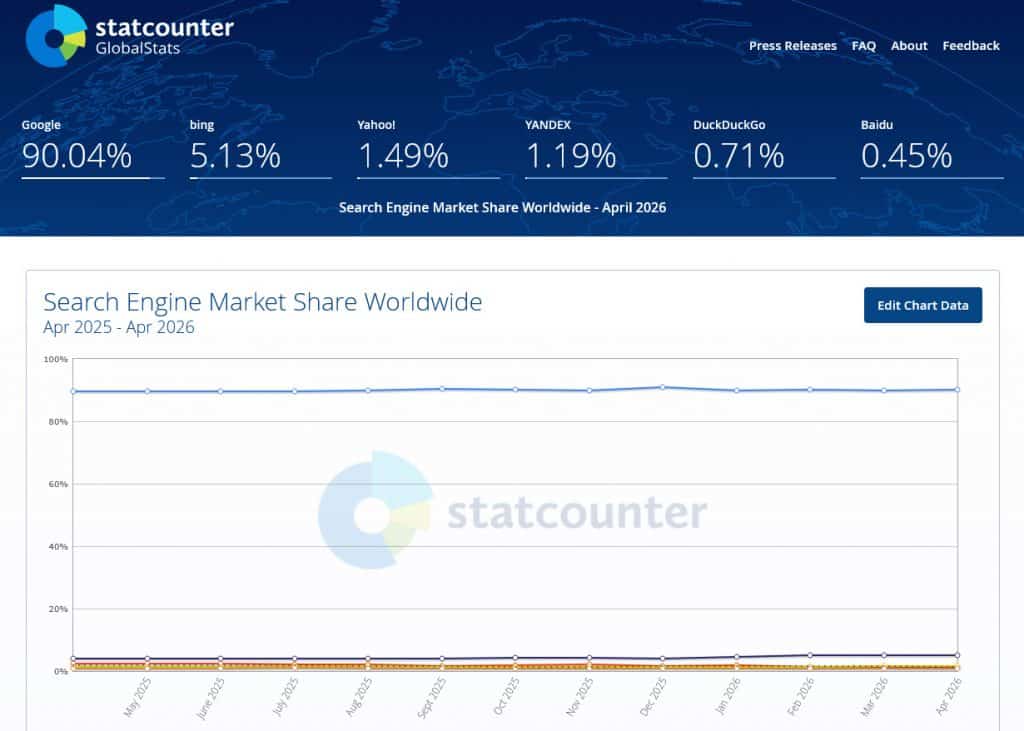
It’s worth noting that in the US and China, Bing’s market share is significantly higher than in Europe — and Ukraine in particular. Though if Google doesn’t start changing course, it may lose ground in Ukraine. Personally, I think Google has degraded considerably since it began experimenting with AI-powered search (not to be confused with Gemini). It can serve Ukrainian users results from the occupying country or in the occupier’s language — despite all my interfaces being set to Ukrainian or English, and despite me using only those two languages.
For example: if I want to read about which Ukrainian missile model struck a Russian military factory on April 5, 2026 — I have no interest in what Russian officials think or what Russian websites say. I want to read about it in Ukrainian or English, not Russian under any circumstances. These feelings may be difficult to convey to those who haven’t had a Russian missile fall nearby — but that’s our reality.
Anyway, I’ve gone off on a bit of a Google tangent. The point is that globally, roughly 10% of search traffic is non-Google. Think that’s negligible?
AI factor
Let’s look at AI assistant usage. At the time of writing: ChatGPT has 900 million users, Google Gemini 750 million, Microsoft Copilot 420 million, and Claude 200 million.
Among major AI assistants, Copilot holds around 15% (including smaller ones like Grok). That’s a considerably higher share than in search — and we’re all watching AI assistant usage grow rapidly. Bing Webmaster Tools offers something Google Search Console doesn’t yet: a dedicated AI Performance section.
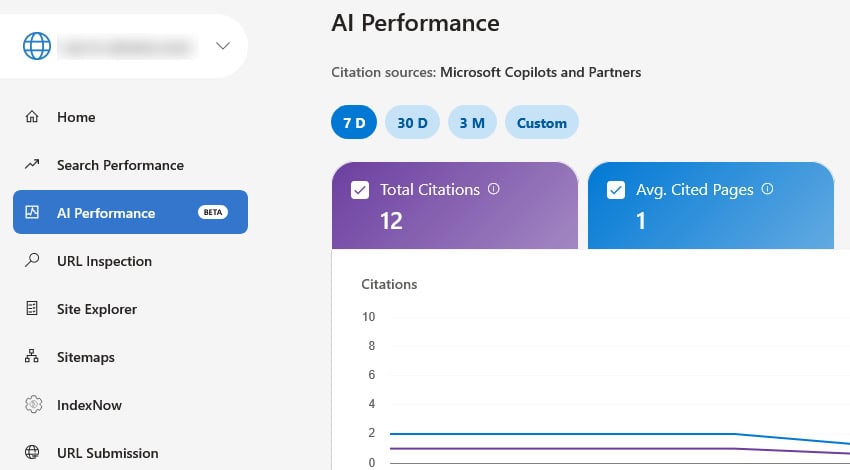
So if you think 10% and 15% are numbers worth ignoring — you can stop reading here. If you think they’re worth your attention and the AI Performance section looks useful — it’s time to give Bing some thought. I won’t walk through adding a site to Bing Webmaster Tools — it’s a straightforward process anyone can handle. Instead, let’s get to the main point.
How to connect IndexNow for Webmaster Tools?
There are several options — from a WordPress plugin to a Cloudflare setting.
If you ask Copilot, it will most likely recommend the IndexNow plugin for WordPress.
Personally, I prefer not to install plugins when a couple dozen lines of code will do the job. Besides, a plugin with a 3-out-of-5 rating in the repository doesn’t inspire confidence — it may have quality issues.
Another option is for Cloudflare users — there’s a dedicated setting there, but since not everyone uses Cloudflare, it’s not a universal solution.
You can also handle this via server configuration (Nginx/Apache), but since not everyone uses a VPS or VDS, that’s not universal either.
For me, the best approach is custom PHP code. Once you’re registered, you’ll need a GUID (Globally Unique Identifier) — a 128-bit integer used to identify resources. 128 bits is large enough, and the generation algorithm so unique, that if you generated 1,000,000,000 GUIDs per second for a year, the probability of a duplicate would be just 50%. You can get one at https://www.guidgenerator.com/.
On Linux/macOS, open Terminal and run:
openssl rand -hex 16On Windows, use PowerShell:
[System.Guid]::NewGuid().ToString("N")Or just ask Copilot or another AI assistant. Save your GUID to a text file with a name of your choosing. In my example, it’s yourfilename.txt.
Copy the file to your server – don’t forget to change the exact path in the code. In my example it’s yoursite.com/yourfilename.txt, yours may have a different path. Then add the following code to your functions.php:
function send_to_indexnow($post_ID, $post, $update) {

    // Only for published posts
    if ( $post->post_status !== 'publish' ) return;

    // Skip autosaves and revisions
    if ( wp_is_post_autosave($post_ID) || wp_is_post_revision($post_ID) ) return;

    $url = get_permalink($post_ID);
    $key = '******'; // your GUID
    $keyLocation = 'https://yoursite.com/yourfilename.txt'; // path to your file

    $payload = json_encode([
        'host' => 'yoursite.com', // your site
        'key' => $key,
        'keyLocation' => $keyLocation,
        'urlList' => [$url]
    ]);

    wp_remote_post('https://api.indexnow.org/indexnow', [
        'headers' => ['Content-Type' => 'application/json'],
        'body' => $payload,
        'timeout' => 3, // Important: don't block WP for too long
    ]);
}

add_action('save_post', 'send_to_indexnow', 10, 3);
The code is compact and well-commented, so I don’t think it needs much explanation. It’s also fully functional — it won’t ping Bing during autosaves, draft saves, or other unnecessary operations. I intentionally used the save_post hook instead of publish_post because I want to ping Bing not only when a post is created, but also when it’s updated.
This same code runs on this site. In a few months I plan to check whether it’s brought additional visitors from Bing and Copilot. If you have questions or suggestions — feel free to leave a comment.
Related posts:

My Plugins on WordPress Repo Were Closed During the War
Today I discovered that my plugins on WordPress Repo were closed. This was not due to any vulnerabilities, copyright issues, or violations. The problem came from my email [...]
What’s New in WordPress 5.1
WordPress 5.1 available on February 21, 2019. It have name “Betty” in honoring American jazz singer Betty Carter. WordPress 5.0 had been downloaded more than 35 million times [...]